
Restaurant Ordering Software Is the Dashboard After the Sale
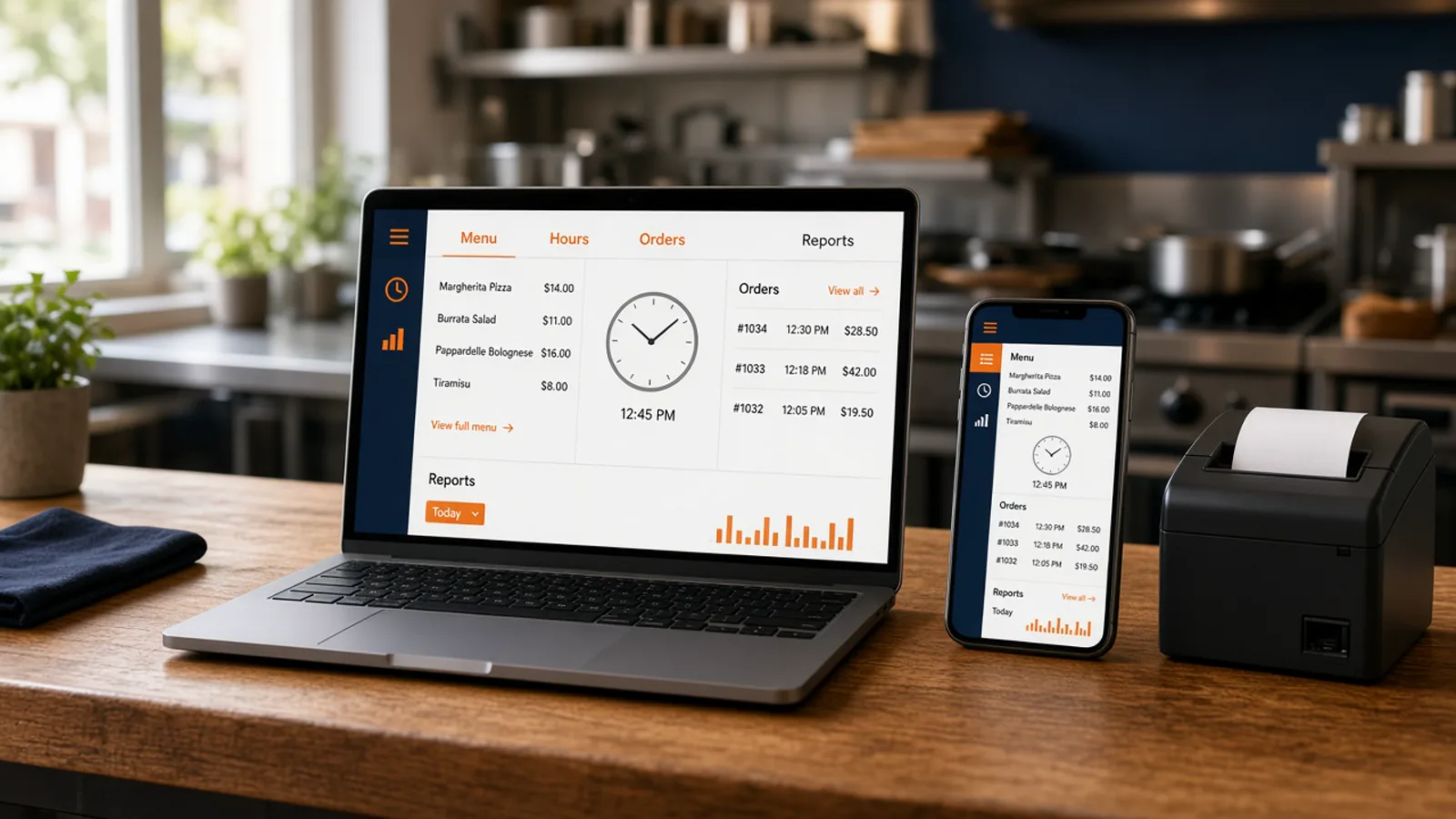
Owners who search for restaurant ordering software are often shown a cart theme. The page a guest taps matters, and it is not the whole purchase. This page is the admin dashboard you open after someone pays: menu edits, hours, order history, and reports.
The guest menu, modifiers, and cart are online ordering menu. A branded site set against a marketplace listing is online ordering platform for restaurants. Modifiers, pickup times, and delivery zones, set against a generic shop, are online ordering platform. A checklist of the whole stack is online ordering system for restaurants. Pie sizes and half and half are pizza online ordering software. Stay here for the dashboard.
Menu Edits the Same Day
Restaurant ordering software has to let someone in the building change the menu. Change a price, add a special, or 86 an item, and the storefront updates. Items, categories, sizes, toppings, and modifiers are not capped. Photos and descriptions are yours.
A modifier is the follow-up the counter already asks, with a price on the choice that costs more. Staff roles decide who can edit. A cook who can see the empty pan should be able to 86 the item without the owner's password.
Once a week, scroll the live menu against what the kitchen can cook and place a test order on the item you edited. The wider menu record, including the Google order link, is restaurant menu management software. The screen for the edit is restaurant admin.
Hours That Open and Close the Cart
Hours belong in the same dashboard. The onboarding wizard asks for them with the profile, the menu, the delivery zones, and billing. After that, hours-aware ordering opens and closes the cart with the hours you posted. A shop that locks the door at nine should not accept a midnight order.
When you close for a holiday, change the hours that day. A social post does not close the cart. The site cannot see it. Pickup still needs a ready time the guest saw before they paid. Delivery still uses the zone, the radius, and the fee you set, for example free delivery within 4 miles.
Match the Door and the Listing
The hours on the glass, the hours in the dashboard, and the hours on your Google Business Profile should be the same clock. Standard includes an order link on that listing. The link opens your storefront. It is not a second menu you maintain inside the listing. If the listing says open and the cart says closed, fix the clock that is wrong before dinner. Those hours are part of how it works.
Order History the Shift Can Open
New orders appear when they are placed. Track each one from new to preparing to ready to delivered. That live board is the shift. The order list behind it is the history. Reports count completed, paid orders. A cart that never paid is not an order. If a total looks off, open the list behind the number.
Phone orders can join that list. Sky AI answers inbound calls, takes a paid pickup or delivery order, and prints it with the web tickets. There is no per-minute fee. You turn it on after onboarding, in Admin, under Integrations.
The ticket should hit the receipt printer the line already uses. If you need a print path, hardware is $500 one-time: a mini PC print server and a receipt printer. Admin runs in the browser on a tablet or computer you already own.
Reports You Can Read on Monday
On Standard, sales reporting shows orders, revenue, average ticket, and best-sellers. That is the Monday read before you change a menu. You do not need a higher plan for those four numbers.
Growth adds conversion rate analytics and SEO performance tracking in the dashboard, after 3 months on Standard. Those reports are described on restaurant admin. They are not part of Standard. A weekly habit for the numbers you do have is restaurant analytics. The shift tour of the same login is MicroSky Food restaurant admin.
If a best-seller has no photo, that is the next dish to shoot. If an item never sells, check the button and the price before you blame the kitchen.
The Dining-Room Register Can Stay
This dashboard runs online orders, the menu, staff access, and reporting in a browser. Keep the dining-room register if servers can already ring a meal. You do not buy a proprietary terminal to see web orders.
You set the delivery zone, the radius, and the fee. MicroSky Food does not dispatch drivers, run a fleet, track drivers, or offer geofencing. Checkout does not add a tip prompt. There is no published Android app. A branded iOS app is on Growth and Growth Plus only, after 3 months on Standard.
What Restaurant Ordering Software Costs
On pricing, Standard is $249 per month plus 5% of net sales, or $499 per month flat. Only that $499 per month Standard option leaves off the percentage of net sales. Growth is $499 per month plus 7% of net sales. Growth Plus is $999 per month plus 10% of net sales. Both require 3 months on Standard. A 30-day free trial does not replace those 3 months. There is no long-term contract.
Set that percentage beside marketplace fees that often land in a 15 to 30% band. On a $40 order, 5% is $2 and 30% is $12. The monthly plan sits on top of either figure. Apple Pay is on Growth and Growth Plus, through Authorize.net, and not on Standard. Bring a Stripe token, connect Authorize.net, or sign up with Electronic Payments.
Open the Dashboard on a Real Order
Start the 30-day free trial. The wizard covers your profile, menu, hours, delivery zones, and billing. A storefront can be set up in about 10 minutes. Place one paid test and find it in the order list. Change one price and confirm the storefront moved. Close the hours and confirm the cart closed.
Restaurants on the platform are on clients. Questions go through contact. See a storefront in the live demo, or open the admin demo. Start 30 Day Free Trial. Call (888) 960-1359.