
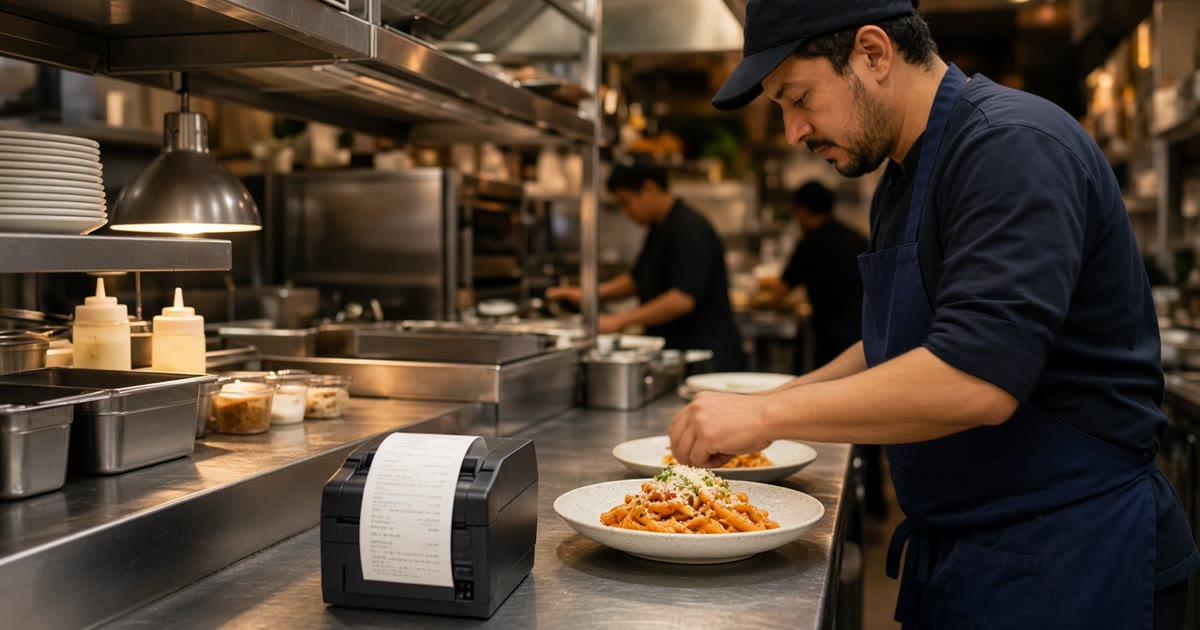
How to run a kitchen in a restaurant is the pass, the stations, and the person who calls the plate. Online orders do not replace that. They add tickets that nobody spoke out loud. If those tickets use a different shape than a walk-in dup, the line will cook the room and ignore the printer.
This post stays on that kitchen. Ticket flow, where the printer sits, how prep stations read the paper, and what expo does when pickup and delivery share the pass. A wider pass at the shift, one board, and staff roles is how to improve restaurant operations. The printer test itself is restaurant order taking app. Stay here for the line.
Run the Kitchen From the Ticket
A kitchen runs on what the cook can fire without a meeting. The dining room still has a server who can walk back and ask. An online order does not. The guest already paid, chose the modifiers, and left. The only instruction is the ticket.
The first job is making the website ask what the counter already asks, in the words the rail already uses. Size, temperature, no onion, half and half, sauce on the side. If those are buttons, the ticket is a plate. If they are a comment box, expo becomes a translator, and tickets die on the spike.
You do not need a station called Online. Online is a channel. Grill, fry, cold, and the oven stay the stations.
Ticket Flow When the Website Joins the Rail
A clean flow is short. The guest pays on your site. The order shows up in restaurant admin as new. The same order prints on the kitchen flow. A cook fires it. Expo checks it. Someone marks it ready, then out for pickup or delivered when it actually leaves. The status words on the board are new, preparing, ready, and delivered. Use those, or agree on the spoken call, but do not invent a private dialect for web tickets.
Phone orders should join that same paper once you turn them on. Sky AI answers inbound calls, takes pickup or delivery, and prints the paid ticket with the web tickets. There is no per-minute fee. You enable it after onboarding, in Admin, under Integrations. If the kitchen can tell a web ticket from a phone ticket by the font, you still have two flows.
Marketplace tablets can stay for strangers. Label the chirp so nobody plates the wrong bag. DoorDash, Uber Eats, and Grubhub often charge 15 to 30% of that sale. Do not let their format become the one your cooks trust more than yours.
One Language on the Paper
Read a ticket the way a new cook would, with the music up. Item, size, modifiers, a true note, pickup or delivery, and a name expo can call. A paragraph in the note field means the menu was not finished. Structured choices feel stricter on the setup afternoon and kinder at 7 p.m.
Place one paid test of the most annoying item you sell. Stand at the pass and read it cold. If you would hand that paper to someone on their first Friday, the flow is ready for that item. If you would not, fix the modifiers before you share the link. The guest-facing menu those buttons live on is online ordering.
Printer Setup the Line Will Trust
Put the printer where eyes already go. On most lines that is the pass, or the lead station that calls the ticket. A printer in the office prints into a void. A printer under the fryer prints into grease. The cooks will not walk over to admire it.
Use the receipt printer you already trust if it still screams on a phone order. MicroSky Food prints to that kitchen flow. You do not need a new point of sale to get paper. If you have no print path, hardware is $500 one-time: a mini PC print server and a receipt printer. Admin runs in the browser on a tablet or computer you already own. The screen is for status and for 86s. The paper is what many cooks will cook from.
Before service, print a test and check that the ticket is readable at arm's length. A blank ticket during the rush is a kitchen that cannot see the order. One board and one printer style, including when the tablet sleeps, is restaurant tablet ordering.
Prep Stations Should Match the Paper
Grill, fry, cold, and the oven already know their jobs. Online orders use those same hands. What fails is a ticket that does not say which lines belong where, so the whole dup sits at expo while three stations wait.
If you have one printer, the lead or expo splits the work out loud, the way they already do for a four-top. Do not promise a separate printer at every station. This setup prints on the kitchen flow you have. The split is a call, or a rail, not a second product.
Online volume does not create a new prep list. It changes the count. If Fridays now sell more of the bowl, the cold station needs that number in the morning. A sold-out item comes off in admin and the storefront updates. Leaving it up is how expo apologizes for a plate the station cannot make.
The Expo Line When Pickup and Delivery Share the Pass
Expo is the last check. The plate matches the ticket, the modifiers are on it, and the bag has the name. Pickup and delivery should not share one pile. One rail for the dining room, one shelf for pickup, one spot for the handoff. If all three sit in a corner, the wrong bag leaves.
Pickup is the path with a ready time the guest already saw. Delivery is only the zone, the radius, and the fee you set, for example free delivery within 4 miles. MicroSky Food does not dispatch drivers, run a fleet, track drivers, or offer geofencing. Expo confirms the food, then hands it to the guest or to whoever you already use for the drive.
A ready status in admin should mean the bag is on the pickup shelf, not that the grill fired the protein five minutes ago. Guests forgive a short wait. They do not forgive a missing side.
Ready Means the Bag Is on the Shelf
Hours should close the cart when the kitchen is closed. A ticket that prints after you locked the door is an expo problem you created in the morning. Update hours for a holiday on the site the same day you change the door. A sold-out special comes off before expo has to refuse it.
Checkout does not add a tip prompt. The paper is the food. The payment already happened.
What the Wider Operations Page Covers Instead
How to run a kitchen in a restaurant, here, is stations, paper, and the pass. Who has a login, and which extra tablet you can unplug, is how to improve restaurant operations. Opening checklists do not belong on the order screen. That split is restaurant task management app.
Whether you need a printer at all is commercial kitchen equipment checklist. A marketplace tablet versus your own tickets is white label restaurant ordering. Finish the pass first.
Plans, Hardware, and the First Paid Test
On pricing, Standard is $249 per month plus 5% of net sales, or $499 per month flat. That plan includes the ordering website, live orders, menu changes, staff roles, printing, and Sky AI phone ordering. You do not need a higher plan to put a ticket on the rail. Growth is $499 per month plus 7% of net sales, after 3 months on Standard. It adds a branded iOS app, a website redesign, app push, and monthly SEO for 5 keywords. Growth Plus is $999 per month plus 10% of net sales, after those same 3 months, and adds email, SMS, and 10 keywords. There is no published Android app. A 30-day free trial does not replace the 3 months.
Apple Pay is on Growth and Growth Plus, through Authorize.net, not on Standard. Bring a Stripe token, connect Authorize.net, or sign up with Electronic Payments. Cash on delivery can cover orders while a merchant application is processing. Hardware is $500 one-time if you need the print server and a receipt printer. There is no long-term contract.
Start the trial. The wizard covers your profile, menu, hours, delivery zones, and billing. A storefront can be set up in about 10 minutes. Pay for one test and print it at the pass before you tell a regular. Setup is how it works. Restaurants on the platform are on clients. Questions go through contact. See a storefront in the live demo. Start 30 Day Free Trial. Call (888) 960-1359.